
Please Call Me
Send Demo on CD
Send Demo in Email
Request Web Demo
Send Info
Join Email List

Click here to view the overview
presentation of entrée.NET


Click here to view the full size PDF


Click here to view larger

The Internet has changed the way we do business, and entrée.NET brings those advantages to your foodservice distribution operation.

The Internet can be a powerful tool for businesses that want to increase their sales while also decreasing costs and improving profit margins. This is especially true when you can offer your customers the convenience of entering their own orders, as well as providing them with the means to increase their own productivity.

The success of Internet based e-commerce and the millions of online shopping sites,  illustrates that when it comes to using the Internet, customers are not only capable and comfortable, but eager. In fact, many of your existing and prospective customers may have already asked you about providing an online extension of your food distribution operation.

If you are considering entrée.NET, chances are that you already have a website or are seriously considering creating one. You realize that you need to give your customers the online experience they have been asking for in order for your business to thrive. You know that by helping them, not only will your customers stay loyal, but the accuracy of orders and sales will both increase, while your costs will be slashed.

Your CUSTOMERS will enjoy the ability to:


  • Easily place orders and use the system 24/7/365.
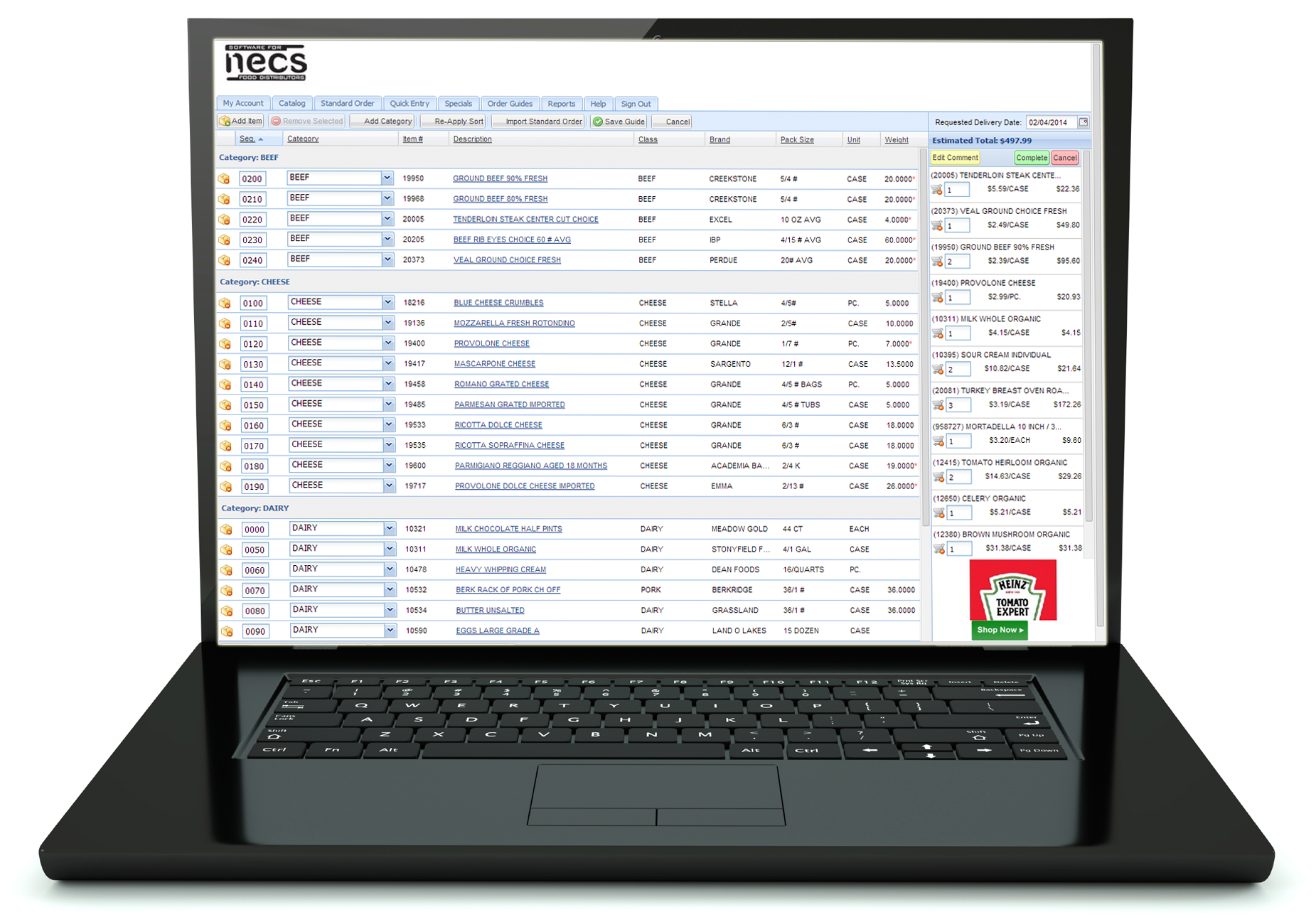
  • Create custom Order Guides to speed them through the ordering process and help ensure they don’t forget critical items.
  • Search and quickly locate items within your product catalog.
  • View extensive information about each item, including: extensive descriptions, photos,  brand names, units of measure, pack sizes, UPC numbers, item notes, nutritional info, etc.
  • View your product catalog by “Tags”, such as: Kosher, Gluten Free, Fat Free, Peanut Free, etc.
  • Generate their own customizable reports, based on 13 months of their purchase history, as Excel spreadsheets or PDF files.
  • View your “Specials” and other items on sale or featured.
  • View their accounts receivable status, including open invoices and payments.
  • View scanned invoices (if you use our entrée.DOC software).

Your SALESPEOPLE will enjoy the ability to:


  • Enter and view orders for any of their assigned customers.
  • Speed through entering orders using the “Standard Order” feature which knows all the products the customer normally orders.
  • If given permission, the ability to enter pricing.
  • Generate customized reports for any of their assigned customers as Excel spreadsheets or PDF files.
  • Track potential new customers by entering Quotes, including the items they are interested in, along with their quoted prices.
  • View sales graphs comparing their top 10 customers.
  • Easily search your product catalog with detailed information, view pricing and weekly specials.
  • Create custom Order Guides geared toward their customers, for each of their customer’s delivery locations, as well as internal departments such as produce, meats, etc.
  • Easily view the status of their customer accounts, including open invoices, payments, credits, etc.
  • Enter orders, manage prospects, generate quotes, print reports, etc. via the ELECTRONIC ORDER PAD.  Click here for more information and sample screenshots about the ELECTRONIC ORDER PAD. 

Your SYSTEM ADMINISTRATOR will enjoy the ability to:


  • Control the colors, grid layouts, restrict specific information, sort order, etc. for all entrée.NET screens.
  • Control countless options such as delivery date rules, minimum and maximum order rules, item pricing, order cutoff times, etc.
  • Email and customer messaging tools, so you can always stay in close contact with your customers.
  • Customize and maintain your external NECS designed website without the need for a web developer.  Access to customize each page, including layout, logos, photos, text, contacts, etc. are provided.

To view specific features that this product offers, please click here.

General


  • entrée.NET is optimized for speed and intensive data demands. It is SQL Server based, designed with PHP 5.
  • entrée.NET works with virtually all computers.
  • entrée.NET will run in many different web browsers; Internet Explorer 7 and 8, Mozilla Firefox, Apple Safari and Google Chrome.
  • Server is guaranteed to be up 99% of the time (besides scheduled maintenance).
  • Daily data backups of your data are performed.
     

Security


NECS understands that your data is precious and should never be allowed to get into the wrong hands.  Because of this, our entrée.NET system was designed to protect your data every step of the way.   The following are some points to reassure you about the security of your data:
  • Customers using your website and entering orders are never directly on or have access to your company’s computer server.
  • Your entrée.NET software will run on a computer server, at a secure, offsite location.
  • All data is encrypted before transmission from your company's in-house server to the entrée.NET server.
  • Once loaded onto the server, your data is protected by several security measures and behind multiple “firewalls” so it’s safe from hackers and other unwanted intruders.
  • When customers log on with an authorized “Username” and “Password,” they can only view their own data, such as their open receivables and sales history. There are also options available to further limit what can be seen by your customers. For instance, you can prevent item prices from showing if you choose.
     

Shared Server vs. Dedicated Server


Normally, entrée.NET runs on a “shared server,” which means your license of the software is running on a server with other NECS customers.  Using a “shared server” is normally fast enough for the average sized food distributor, having less than 500 orders/day entered via the entrée.NET system.
  • You also have the option to run entrée.NET on a “dedicated server”.  This server would be maintained for you by NECS and would be devoted to your company’s use.
  • A dedicated server is ideal for food distributors with a large amount of data and many customer transactions, as it would provide the fastest possible operation of entrée.NET.
  • NECS recommends a dedicated server for our customers who average more than 500 customer orders/day.
Pricing for the NECS entrée.NET system starts at $995 and increases depending on the options selected.

If you would like more information related to pricing or a specific quote for your company’s needs, please click here.

If you currently are not an NECS entrée software user and do not have plans to make the switch to entree, but would like to utilize the entrée.NET and ELECTRONIC ORDER PAD technology with your current software, then our “Private Label Server License” may be right for you.

Because we designed entrée.NET with an “open interface”, it is possible that it can interface with your current ERP / accounting software. 

As long as you have access to export necessary data (such as customer, inventory, special pricing, open accounts receivable, etc.) and then import customer order data (as entered into entrée.NET and/or the ELECTRONIC ORDER PAD) , then the “Private Label Server License” may be your perfect solution.

Benefits of the “Private Label Server License”:

  • Designed for the specific needs of food service distributors that normal e-commerce solutions cannot handle.
  • Enables you to use the proven, field tested and reliable technology of entrée.NET and the ELECTRONIC ORDER PAD, which currently processes almost $1 million (and growing) sales per day for NECS customers.
  • Eliminates the time required to create your own solution.
  • Eliminates the bugs and headaches you would have to deal with if creating your own solution.
  • You pay one flat fee for the server license, and a monthly set fee for Software Maintenance.  Whether you process 100 orders/day or 1 million orders/day, there are no extra fee’s (as long as your server can handle the traffic).
  • The “Private Labeling” concept removes all references to “entrée”, so that it appears to your customers and DSR’s (Distributor Sales Reps) as your own application.
  • Ideal for large food distributors looking to immediately roll out a proven solution.
  • Ideal for computer software companies looking to provide a new option for their customer base, along with a new revenue stream.
  • Server runs under Linux providing speed, stability and a lower cost point vs. Windows Server.
  • NECS can customize any part of entrée.NET and the ELECTRONIC ORDER PAD to address your company’s specific needs at a reasonable price.
  • NECS will build the server for you and guarantee all software modules are installed properly and operational.

Server Specifications (subject to change):

  • Linux, RHEL5 recommended or CentOS 5
  • PostgreSQL 8.4 database engine
  • Apache 2.2.x
  • PHP 5.2.x (modules: PDO, mcrypt, mbstring, pgsql, gd, xml)

If you would like more information related to pricing or a specific quote for your company’s needs, please click here.

Version 3.6.17


Date: 02/26/2013

Click here to download the PDF!


Feature Flash Summary:


Features Flash entrée 3.6.17 feature: Salesperson / Broker File Maintenance NET / EOP Tab. entrée.NET 3.3.11 New Administrator System Options: Website Address Settings, Prevent entry of quantities exceeding the defined maximum warning quantity, Use Future Pricing in Order Entry, Show warning if Unit Price is below Base Cost when adding items, Display Customer Hot Message, Order cutoff time, Default delivery date to next scheduled delivery day, Allow salesperson to enter credits on orders, Allow salesperson to create Credit Memos, and Display “True” inventory on hand information. New entrée.NET 3.3.11 Features: Enhanced Customer Address Information, Website Support for Mobile Devices and New Pop-Up Catalog Add-on Module Option. Electronic Order Pad 3.3.11 Features: Create Credit Memo Feature, Credits Tab Feature, Display “True” Inventory On Hand Information, Import order comments from Comment File Maintenance in entrée, Display Customer Hot Messages, Create & Save Report Configurations,Report Brand Name Sort Option and Bill To / Ship To Fields in Open Balances Report. .


Version 3.6.13a


Date: 09/27/2012

Click here to download the PDF!


Feature Flash Summary:


entrée Version 3.6.13 Features Create/Change Invoice - Invoice Date Change on Non-Blank Invoices and View/Edit Customer Notes from Ordertaker Call List. Release AP/AR - Market & Landed Cost Calculation Options Added to Release from Accounts Receivable. Document Printing By Order Source. System Option #179 - Allow Promotions to be Applied to Credit Items. Create/Change Purchase Order E-mail P.O. Feature Enhancement. Report Updates - Updated Gross Profit Calculations for Bill Backs. Aging Report - New “Overdue By” and “Days Old” Column Options. Commodity Report Calculations. Below Cost Report Tran Code. New Inventory Usage Action Report. entrée.NET/Electronic Order Pad(EOP)- Export from entrée to Include Unprinted Invoices. NET Scheduler Detects Large File Support and FoxPro 3.0. Salesperson / Broker File Option - Receives Data From All Salespersons. Electronic Warehouse Manager (entrée.EWM)- Product Recall Report Updated for entrée.EWM. entrée.NET Version 3.3.8 & Electronic Order Pad Features - New entrée.NET System Options - Allow Registration Request on Login Page, Allow Salesperson to View Contact Manager, and Display Price Change Indicator. Electronic Order Pad (EOP)Features - New “Order Status” Screen Replaces “Online Orders” Screen. Viewing entrée.DOC Scanned Invoices in Order Status, Dashboards, Customer Account Inquiry and View Invoice. Email entrée.DOC Scanned Invoices. entrée.DOT Features - New Scan for Invalid Inventory Items Utility.


Version 3.6.12a


Date: 07/30/2012

Click here to download the PDF!


Feature Flash Summary:


entrée Version 3.6.11 Features: entrée System Options - System Option #176 - "Recalculate Unit Price when applying an item substitution". System Option #177 - "Special Pricing is allowed to override Minimum Sell Price". System Option #178 - “Prevent oversell of 'case' item when breaking cases". System Preferences - Option to “Update pricing on Kits” on the Personal Settings Tab. Vendor File - “Ship Via” and “FOB” fields added to set defaults for new POs. Auto Generate Purchase Orders - The generated Purchase Order will now use the Monetary Exchange feature to show the unit cost in the currency of the vendor. entrée Report Updates & Additions - Inventory Kits Report - New report with 2 styles Recipe and Ingredient Detail. Special Price / Standard Order Report - Updated to group, sort and print by Special Cost with Base or Real values. Open Invoice Register Report - Added a new option to print for Credit Memos only. When used this option will only show credits which have an un-applied balance in the report. entrée.GL Version 3.6.11 Features: GL General Ledger Report - Updated so you can group, sort and print by GL Department. Balance Sheet Report - Updated so you can group, sort and print by GL Department only when using Detail style for this report. Income Statement Report - Updated so you can group, sort and print by GL Department only when using Detail style for this report. entrée.NET Version 3.3.7 Features: Language Translator and System Option for entrée.NET Featured Brands. ELECTRONIC ORDER PAD Features: New Calendar Tool for Dates, Customer Shortages Feature and Delivery Date Rules Now Supported. entrée.DSR Version 1.1.21 Features: Group Code Pricing Data Relocated and Support for entrée System Option #178.


Version 3.3.7


Date: 07/20/2012

Click here to download the PDF!


Feature Flash Summary:


Our new entrée.NET Language Translator Service will automatically translate all your Class Names, Item Description line 1, Item Description line 2 and Item Notes into your choice of over 50 of the most popular languages. Having language translations in entrée.NET allows customers entering orders online to view your catalog in their native language. Once activated your Language Translator license allows you to select two languages for use in entrée.NET. You will be billed $50 monthly for the service as long as it is activated.


Version 3.6.12


Date: 07/19/2012

Click here to download the PDF!


Feature Flash Summary:


entrée Version 3.6.11 Features: entrée System Options - System Option #176 - "Recalculate Unit Price when applying an item substitution". System Option #177 - "Special Pricing is allowed to override Minimum Sell Price". System Option #178 - “Prevent oversell of 'case' item when breaking cases". System Preferences - Option to “Update pricing on Kits” on the Personal Settings Tab. Vendor File - “Ship Via” and “FOB” fields added to set defaults for new POs. Auto Generate Purchase Orders - The generated Purchase Order will now use the Monetary Exchange feature to show the unit cost in the currency of the vendor. entrée Report Updates & Additions - Inventory Kits Report - New report with 2 styles Recipe and Ingredient Detail. Special Price / Standard Order Report - Updated to group, sort and print by Special Cost with Base or Real values. Open Invoice Register Report - Added a new option to print for Credit Memos only. When used this option will only show credits which have an unapplied balance in the report. entrée.GL Version 3.6.11 Features: GL General Ledger Report - Updated so you can group, sort and print by GL Department. Balance Sheet Report - Updated so you can group, sort and print by GL Department only when using Detail style for this report. Income Statement Report - Updated so you can group, sort and print by GL Department only when using Detail style for this report. entrée.NET Version 3.3.7 Features: Language Translator and System Option for entrée.NET Featured Brands. ELECTRONIC ORDER PAD Features: New Calendar Tool for Dates, Customer Shortages Feature and Delivery Date Rules Now Supported. entrée.DSR Version 1.1.21 Features: Group Code Pricing Data Relocated and Support for entrée System Option #178.


Version 3.6.11


Date: 07/17/2012

Click here to download the PDF!


Feature Flash Summary:


entrée Version 3.6.11 Features: entrée System Options - System Option #176 - "Recalculate Unit Price when applying an item substitution". System Option #177 - "Special Pricing is allowed to override Minimum Sell Price". System Option #178 - “Prevent oversell of 'case' item when breaking cases". System Preferences - Option to “Update pricing on Kits” on the Personal Settings Tab. Vendor File - “Ship Via” and “FOB” fields added to set defaults for new POs. Auto Generate Purchase Orders - The generated Purchase Order will now use the Monetary Exchange feature to show the unit cost in the currency of the vendor. entrée Report Updates & Additions - Inventory Kits Report - New report with 2 styles Recipe and Ingredient Detail. Special Price / Standard Order Report - Updated to group, sort and print by Special Cost with Base or Real values. Open Invoice Register Report - Added a new option to print for Credit Memos only. When used this option will only show credits which have an unapplied balance in the report. entrée.GL Version 3.6.11 Features: GL General Ledger Report - Updated so you can group, sort and print by GL Department. Balance Sheet Report - Updated so you can group, sort and print by GL Department only when using Detail style for this report. Income Statement Report - Updated so you can group, sort and print by GL Department only when using Detail style for this report. entrée.NET Version 3.3.7 Features: Language Translator and System Option for entrée.NET Featured Brands. ELECTRONIC ORDER PAD Features: New Calendar Tool for Dates, Customer Shortages Feature and Delivery Date Rules Now Supported. entrée.DSR Version 1.1.21 Features:Group Code Pricing Data Relocated and Support for entrée System Option #178.


Version 3.6.9


Date: 05/09/2012

Click here to download the PDF!


Feature Flash Summary:


entrée Version 3.6.9 Features: System Option # 175, Brand File Exclusion Options, Class File Exclusion Options, Change Invoice History Button, Auto Generate Purchase Orders - Exclude customer past sales, and entrée.UPC / Electronic Loading Sheet - Dashboard. entrée.NET version 3.3.6 & Electronic Order Pad Features - Modifications to entrée.NET System Options, entrée.NET Website Catalog Display of Case / Piece Items, and Support for "One Ship" Customer Configurations. entrée.NET version 3.3.6 Website Features - Website Option for Multiple Featured Vendors and Expanded Features for entrée.NET Website Ads.


Version 3.6.8a


Date: 04/04/2012

Click here to download the PDF!


Feature Flash Summary:


entrée Version 3.6.8 - System Option to Send Email Using SSL Encrypted Servers. Inventory Kits Tab “Copy Item” button Copies Ingredients List. Brand Maintenance “Internet Image Search” Button Added for EOP and entrée.NET. entrée.DOC - "Scan Loading Sheets" Dialog Compatible with Windows Font Scaling on Computers with Vista and Windows 7. entrée.QB - entrée Close Purchase Order Procedure Can Post to entrée.QB Accounts Payable. entrée.MW - Transfer / Save Processes Display Progress Bar. Save Process Hides “OK” Button. Order Guide Mode “Escape” Button Change. entrée.NET version 3.3.5 & Electronic Order Pad Features - System Option to Display Manufacturer’s Item Numbers. New Catalog Item# Tab Lists All Items & Disables Grouping. Support for Matrix Code Pricing. entrée Data Export to entrée.NET Supports Matrix Code Pricing.


Version 3.6.7b


Date: 03/15/2012

Click here to download the PDF!


Feature Flash Summary:


"Special Order” Items Support added to entrée,entrée.NET,entrée.EOP and entrée.DSR. Metric Conversion factor updated to be more accurate in entrée, entrée.DSR & entrée.UPC. entrée version 3.6.7 - 3.6.7a; Assign Routes “Re-assign Invoice Date” Security Option, Invoicing updates count and weight totals,Search Inventory by Manufacturer’s Item Number,Create/Change Invoice enhancements to Prior Sales dialog and Sale Price save, Reports updates, Customer File “Exclude from .NET Export” Option. entrée.NET version 3.3.4 - Display Manufacturer Item # in Catalog Page of the Website. entrée.DSR version 1.1.19 - Access to View Inventory and Customers Updated. entrée.UPC version 2.2.10 - Metric conversion factor. Electronic Order Pad (EOP)- Generate, View and Email Reports, Quantity Ordered Field Format Change. entrée.DOT - Sync UPC Code Feature. entrée.FS - Salesperson Laptop Permissions for Food Show module.


Version 3.6.7a


Date: 02/15/2012

Click here to download the PDF!


Feature Flash Summary:


"Special Order” Items Support added to entrée,entrée.NET,entrée.EOP and entrée.DSR. Metric Conversion factor updated to be more accurate in entrée, entrée.DSR & entrée.UPC. entrée version 3.6.7 - 3.6.7a; Assign Routes “Re-assign Invoice Date” Security Option, Invoicing updates count and weight totals,Search Inventory by Manufacturer’s Item Number,Create/Change Invoice enhancements to Prior Sales dialog and Sale Price save, Reports updates, Customer File “Exclude from .NET Export” Option. entrée.NET version 3.3.4 - Display Manufacturer Item # in Catalog Page of the Website. entrée.DSR version 1.1.19 - Access to View Inventory and Customers Updated. entrée.UPC version 2.2.10 - Metric conversion factor. Electronic Order Pad (EOP)- Generate, View and Email Reports, Quantity Ordered Field Format Change. entrée.DOT - Sync UPC Code Feature. entrée.FS - Salesperson Laptop Permissions for Food Show module.


Version 3.6.6


Date: 12/20/2011

Click here to download the PDF!


Feature Flash Summary:


Assign Routes Refresh options, IFM Brand name, Brand Maintenance utility, Invoicing pieces per case, cost price update for piece items, Open Credits process, Picking Labels options to configure with temperature zones and only print for catchweight items. entrée.UPC Activity Log Report and Product Recall Report. entrée.NET Orders section on Home tab, Display Gross Profit dollars and percent in cart option, added support for color coding DOT Foods items. Website new Ads system for Banner ads. Min / Max Order weight option. Electronic Order Pad can Display Brand images, Edit description in orders, view pending orders and invoices.


Version 3.6.5


Date: 11/16/2011

Click here to download the PDF!


Feature Flash Summary:


Inventory search by Manufacturer Item number, Invoicing show last received date option, Enter Payables sort by check date or check number options, Picking Labels Box Id value. entrée.DOT support for 8 tier pricing. Electronic Order Pad system options for GP review, allow sales to enter route number, Hide gross profit in order entry screen, Brand support added. entrée.NET search by item UPC, Date Filtered standard order, option to show only items in the last standard order, Allow sales to enter prices below base cost, enforce credit hold for salespeople. Website features to email blog postings and utilize 3rd party mailing lists.


Version 3.6.1


Date: 07/21/2011

Click here to download the PDF!


Feature Flash Summary:


Assign Routes utility refresh options, system options, Stop Numbers. Unlimited Company Invoice Headings, IFM internet image search, Apply promotion to price break option, show landed cost in future pricing, access to apply credit discount in cash receipts, report enhancements entrée.NET – Website Blog, Join Our Email List, Contact Email. Salesperson Call List, Resend Customer Account Information, DOT Foods support and Electronic Order Pad support. entrée.DOT – Introduction to product features. entrée.DSR – Gross Profit adjustments for Bottle Deposits and Lot Based items priced by weight. Electronic Order Pad - Introduction to product features.


Version 3.2.4


Date: 04/15/2011

Click here to download the PDF!


Feature Flash Summary:


Website Social Networking feature to add feeds for Twitter and Facebook. Now add web page Background images and ability to display large item images.


Version 3.5.14


Date: 02/10/2011

Click here to download the PDF!


Feature Flash Summary:


Manufacturer File Maintenance utility, assigning manufacturers to items, list of reports supporting manufacturer, AR Release Journal report, Modify Special Prices customer exclusion filter. UPC Bar codes available in reports and labels. entrée.NET - Order Import Report company name field, Promotions feature, Forgotten Password reset option, website sort options. entrée.WMS enhancements.


Version 3.5.13a


Date: 12/22/2010

Click here to download the PDF!


Feature Flash Summary:


Calculate Gross Profit using Landed Cost, Invoicing shows Last Sale Date, Last Price, Last Profit percent, Physical Adjustments by Class, Inventory Count Sheet catchweight lines. entrée.NET – Export utility, Import Scheduler options, Case Count, Unit Price Warning, Password change and viewing, Restricted Items, Default Order Guide, Min/Max Order Quantity, Website Design tools: Color schemes, Banner editor, Default Sort options. Forgotten Password reset option. entrée.AP – Company Maintenance Discount and Adjustment Accounts assignments


Home  |  About  |  Products  |  Solutions |  Support  | Partners  |  Contact | Sitemap