|           |
![]() |
|
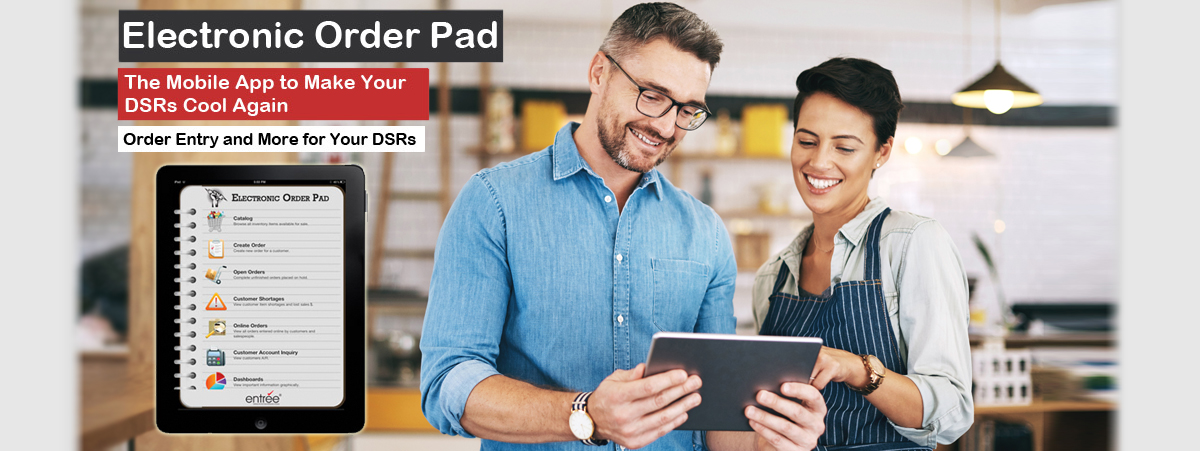
The ELECTRONIC ORDER PAD will become the tool your DSR’s (Distributor Sales Rep) value most to get their jobs done effectively and efficiently.
It was created to be run on a tablet computer (such as the Apple iPad 2 and Android) and is unlike anything your DSR’s have ever experienced.
The large, high-resolution display allows your DSR’s to see their work like never before. It is incredibly thin and light, and provides instant-on access at the press of a button, so work is almost always at-hand.
The Multi-Touch screen on the tablet is incredibly precise and responsive, which allows DSR’s to work using just their fingers or a stylus, with little need for training or support. And with up to ten hours of battery life, the ELECTRONIC ORDER PAD is always ready to work whenever your DSR’s are.
To view specific features that this product offers, please click here.
![]() Easy to operate with your finger. Click to enlarge | ![]() Even faster and easier with a stylus. Click to enlarge |
"The ELECTRONIC ORDER PAD kicks butt! Best thing NECS has put out. |
1. Which model iPad works with the ELECTRONIC ORDER PAD?
2. Which Android tablets are you compatible with?
3. Some of my salespeople can be rough on equipment. Do you have any advice to help ruggedize the iPad?
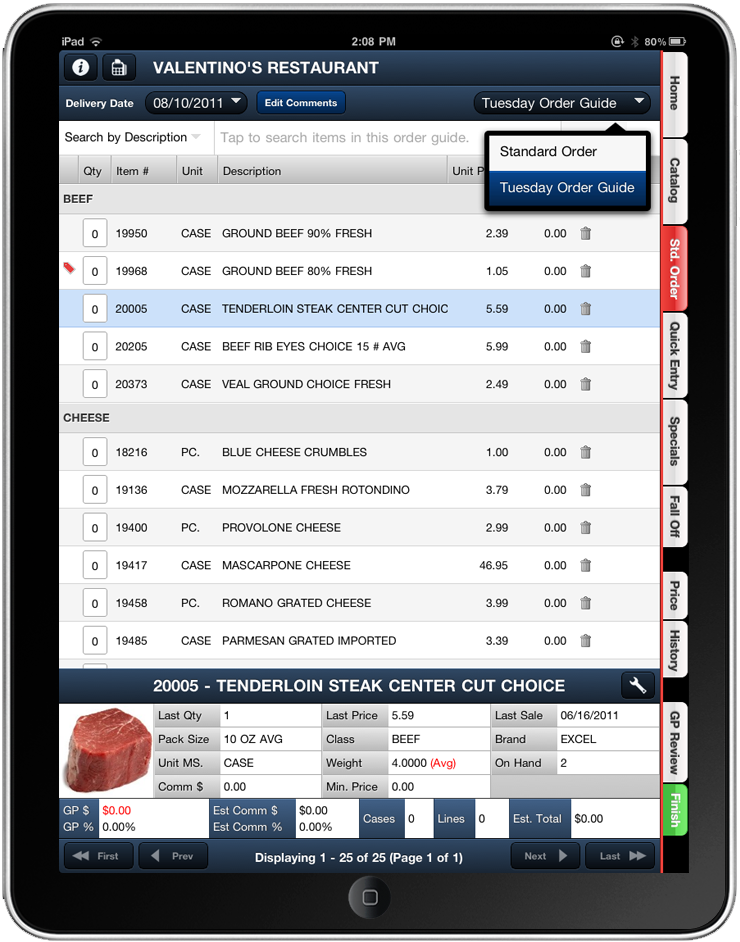
4. What exactly does the ELECTRONIC ORDER PAD do?
5. How does the ELECTRONIC ORDER PAD link to my office?
6. How does my company data get to the entrée.NET secure server?
7. I am very interested in using the ELECTRONIC ORDER PAD for my salespeople, but I currently do not use your NECS entrée software. Is it possible to use in my situation?
8. Can my inventory on hand quantities be live?
9. Does the ELECTRONIC ORDER PAD need to have Internet access to use it?
10. How are ELECTRONIC ORDER PAD program updates / bug fixes installed?
11. Does the ELECTRONIC ORDER PAD get installed via the Apples iTunes store?
12. Is any of my company’s data stored on the iPad?
13. Can the ELECTRONIC ORDER PAD automatically have Loading Sheets print at my office?
14. Can I scan barcodes to create a customer’s order?
15. Will my salespeople see Gross Profit and Commission information?
16. What is the item “Fall Off” listing?
17. What is the “customer item display” screen?
18. What control over the customers Standard Order will the salesperson have?
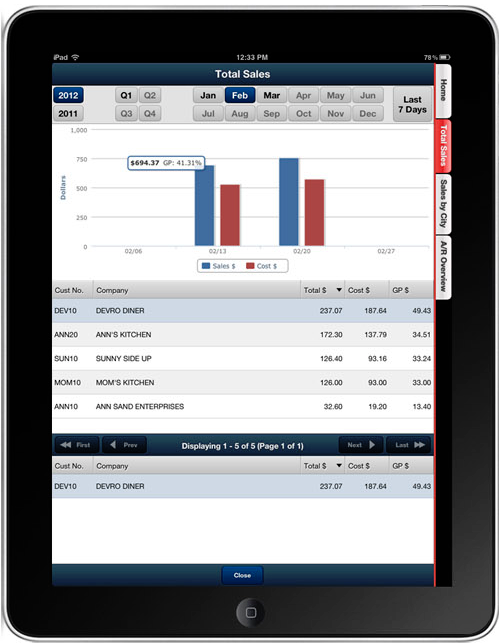
19, What kind of Dashboards can I view on the ELECTRONIC ORDER PAD?
20. What reports can be generated with the ELECTRONIC ORDER PAD?
21. Will my salespeople have access to the Contact info in entrée?
22. Can my salespeople create quotes for potential new customers?
23. I really like the ELECTRONIC ORDER PAD, but currently own entrée.DSR for my salespeople. Do you offer an upgrade path to go from entrée.DSR to the new ELECTRONIC ORDER PAD iPad software?
24. What is the cost of the ELECTRONIC ORDER PAD?
25. Can I use Apple’s “Facetime” application?
If you currently are not an NECS entrée software user and do not have plans to make the switch to entree, but would like to utilize the entrée.NET and ELECTRONIC ORDER PAD technology with your current software, then our “Private Label Server License” may be right for you.
Because we designed entrée.NET with an “open interface”, it is possible that it can interface with your current ERP / accounting software.
As long as you have access to export necessary data (such as customer, inventory, special pricing, open accounts receivable, etc.) and then import customer order data (as entered into entrée.NET and/or the ELECTRONIC ORDER PAD) , then the “Private Label Server License” may be your perfect solution.
Benefits of the “Private Label Server License”:
Server Specifications (subject to change):
If you would like more information related to pricing or a specific quote for your company’s needs, please click here.
Version 3.3.11Date: 05/02/2013 Click here to download the PDF!Feature Flash Summary:Once you have your Android tablet for Electronic Order Pad you have a few setup steps that must be completed before you can download and install the ELECTRONIC ORDER PAD Android app. This guide will cover Android Tablet setup, App installation, Running the Demo app, installing the Live app, Android Bluetooth printer installation and Bluetooth printing of order confirmation receipts. |
|
Version 3.3.11Date: 03/25/2013 Click here to download the PDF!Feature Flash Summary:The Electronic Order Pad (EOP) will become the tool your DSRs (Distributor Sales Reps) will value most to get their jobs done effectively and efficiently. This is the User Guide for the tablet device application that works with entrée.NET and the main entrée system. New features in version 3.3.11: + The new Create Credit Memo main menu option will allow you to create credit memos that will be imported into the main entrée system. + The new Credits Tab in Create Order allows you to add a credit item to the current invoice. + For reports you can now customize and save the report configurations you have created for reuse. + Import comments from the Comments File in the main entrée system to add to the Comments area of your orders. + Hot Messages you set up for customers in entrée will now display in the Customers, Order Status, Open Order and Create Order screens. + New Order Entry options: 1. Prevent Entry of Quantities Exceeding the Defined Maximum Warning Quantity. 2. Use Future Pricing in Order Entry. 3. Order Cutoff Time. 4. Default Delivery Date to Next Scheduled Delivery Day. + New Salespeople options: 1. Show Warning if Unit Price is Below Base Cost When Adding Items. 2. Display Customer Hot Message. + In entree Salesperson/Broker File Maintenance: The new NET/EOP Tab has two options: "Include data for ALL salespeople" and "Include data for listed salespeople". You will select a salesperson in the entrée system and set Salesperson Linking options for coverage of customers. |
|
Version 3.3.11Date: 03/05/2013 Click here to download the PDF!Feature Flash Summary:ELECTRONIC ORDER PAD product features are reviewed in this PDF. The ELECTRONIC ORDER PAD is our first mobile application based off entrée.NET. This means the ELECTRONIC ORDER PAD communicates directly with a remote entrée.NET secure server, and not your local server in your office. The ELECTRONIC ORDER PAD is a 'connected' application. This means your tablet must have Internet access to create orders, etc.. This can be either WIFI or through a cell network such as Verizon with their data plan. The ELECTRONIC ORDER PAD will become the tool your DSRs (Distributor Sales Rep) value most to get their jobs done effectively and efficiently. It was created to be run on a tablet computer (such as the Apple iPad 2 and Android tablets) and is unlike anything your DSRs have ever experienced. |
|
Version 3.6.17Date: 02/26/2013 Click here to download the PDF!Feature Flash Summary:Features Flash entrée 3.6.17 feature: Salesperson / Broker File Maintenance NET / EOP Tab. entrée.NET 3.3.11 New Administrator System Options: Website Address Settings, Prevent entry of quantities exceeding the defined maximum warning quantity, Use Future Pricing in Order Entry, Show warning if Unit Price is below Base Cost when adding items, Display Customer Hot Message, Order cutoff time, Default delivery date to next scheduled delivery day, Allow salesperson to enter credits on orders, Allow salesperson to create Credit Memos, and Display “True” inventory on hand information. New entrée.NET 3.3.11 Features: Enhanced Customer Address Information, Website Support for Mobile Devices and New Pop-Up Catalog Add-on Module Option. Electronic Order Pad 3.3.11 Features: Create Credit Memo Feature, Credits Tab Feature, Display “True” Inventory On Hand Information, Import order comments from Comment File Maintenance in entrée, Display Customer Hot Messages, Create & Save Report Configurations,Report Brand Name Sort Option and Bill To / Ship To Fields in Open Balances Report. . |
|
Version 3.3.10Date: 11/16/2012 Click here to download the PDF!Feature Flash Summary:The iPad device setup procedure must be performed by the DSR on their assigned tablet device before it can be used with the Electronic Order Pad app. You will first Connect to entrée.NET on your company’s website then proceed to the Creating the Electronic Order Pad Shortcut Icon process and proceed to the final steps in the Sign-in and Start Using Electronic Order Pad section. |
|
Version 3.6.13aDate: 09/27/2012 Click here to download the PDF!Feature Flash Summary:entrée Version 3.6.13 Features Create/Change Invoice - Invoice Date Change on Non-Blank Invoices and View/Edit Customer Notes from Ordertaker Call List. Release AP/AR - Market & Landed Cost Calculation Options Added to Release from Accounts Receivable. Document Printing By Order Source. System Option #179 - Allow Promotions to be Applied to Credit Items. Create/Change Purchase Order E-mail P.O. Feature Enhancement. Report Updates - Updated Gross Profit Calculations for Bill Backs. Aging Report - New “Overdue By” and “Days Old” Column Options. Commodity Report Calculations. Below Cost Report Tran Code. New Inventory Usage Action Report. entrée.NET/Electronic Order Pad(EOP)- Export from entrée to Include Unprinted Invoices. NET Scheduler Detects Large File Support and FoxPro 3.0. Salesperson / Broker File Option - Receives Data From All Salespersons. Electronic Warehouse Manager (entrée.EWM)- Product Recall Report Updated for entrée.EWM. entrée.NET Version 3.3.8 & Electronic Order Pad Features - New entrée.NET System Options - Allow Registration Request on Login Page, Allow Salesperson to View Contact Manager, and Display Price Change Indicator. Electronic Order Pad (EOP)Features - New “Order Status” Screen Replaces “Online Orders” Screen. Viewing entrée.DOC Scanned Invoices in Order Status, Dashboards, Customer Account Inquiry and View Invoice. Email entrée.DOC Scanned Invoices. entrée.DOT Features - New Scan for Invalid Inventory Items Utility. |
|
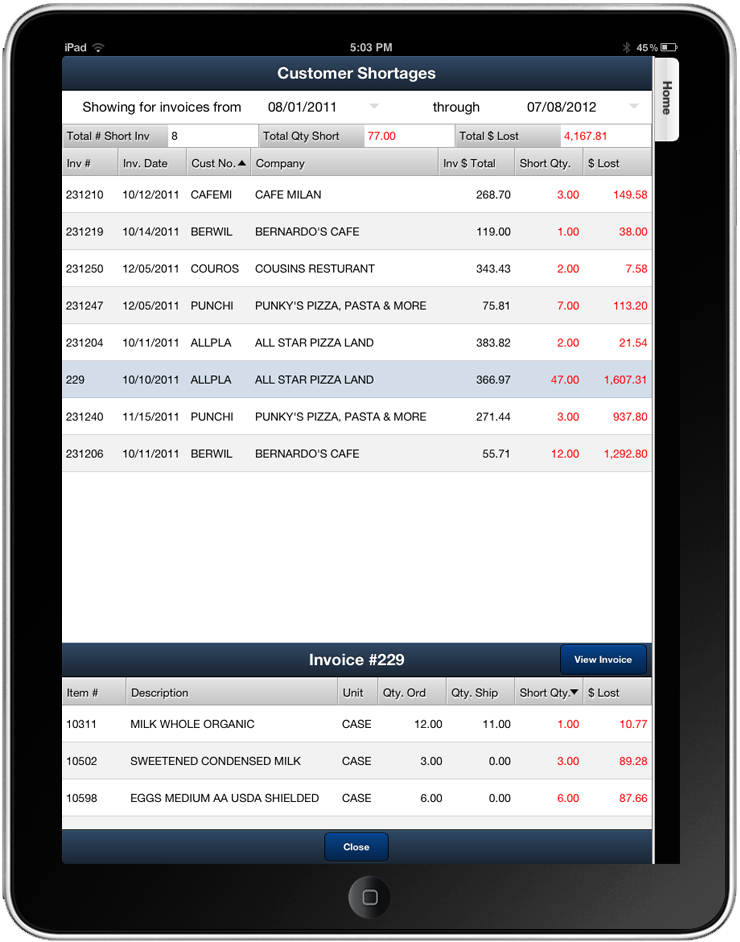
Version 3.6.12aDate: 07/30/2012 Click here to download the PDF!Feature Flash Summary:entrée Version 3.6.11 Features: entrée System Options - System Option #176 - "Recalculate Unit Price when applying an item substitution". System Option #177 - "Special Pricing is allowed to override Minimum Sell Price". System Option #178 - “Prevent oversell of 'case' item when breaking cases". System Preferences - Option to “Update pricing on Kits” on the Personal Settings Tab. Vendor File - “Ship Via” and “FOB” fields added to set defaults for new POs. Auto Generate Purchase Orders - The generated Purchase Order will now use the Monetary Exchange feature to show the unit cost in the currency of the vendor. entrée Report Updates & Additions - Inventory Kits Report - New report with 2 styles Recipe and Ingredient Detail. Special Price / Standard Order Report - Updated to group, sort and print by Special Cost with Base or Real values. Open Invoice Register Report - Added a new option to print for Credit Memos only. When used this option will only show credits which have an un-applied balance in the report. entrée.GL Version 3.6.11 Features: GL General Ledger Report - Updated so you can group, sort and print by GL Department. Balance Sheet Report - Updated so you can group, sort and print by GL Department only when using Detail style for this report. Income Statement Report - Updated so you can group, sort and print by GL Department only when using Detail style for this report. entrée.NET Version 3.3.7 Features: Language Translator and System Option for entrée.NET Featured Brands. ELECTRONIC ORDER PAD Features: New Calendar Tool for Dates, Customer Shortages Feature and Delivery Date Rules Now Supported. entrée.DSR Version 1.1.21 Features: Group Code Pricing Data Relocated and Support for entrée System Option #178. |
|
Version 3.6.12Date: 07/19/2012 Click here to download the PDF!Feature Flash Summary:entrée Version 3.6.11 Features: entrée System Options - System Option #176 - "Recalculate Unit Price when applying an item substitution". System Option #177 - "Special Pricing is allowed to override Minimum Sell Price". System Option #178 - “Prevent oversell of 'case' item when breaking cases". System Preferences - Option to “Update pricing on Kits” on the Personal Settings Tab. Vendor File - “Ship Via” and “FOB” fields added to set defaults for new POs. Auto Generate Purchase Orders - The generated Purchase Order will now use the Monetary Exchange feature to show the unit cost in the currency of the vendor. entrée Report Updates & Additions - Inventory Kits Report - New report with 2 styles Recipe and Ingredient Detail. Special Price / Standard Order Report - Updated to group, sort and print by Special Cost with Base or Real values. Open Invoice Register Report - Added a new option to print for Credit Memos only. When used this option will only show credits which have an unapplied balance in the report. entrée.GL Version 3.6.11 Features: GL General Ledger Report - Updated so you can group, sort and print by GL Department. Balance Sheet Report - Updated so you can group, sort and print by GL Department only when using Detail style for this report. Income Statement Report - Updated so you can group, sort and print by GL Department only when using Detail style for this report. entrée.NET Version 3.3.7 Features: Language Translator and System Option for entrée.NET Featured Brands. ELECTRONIC ORDER PAD Features: New Calendar Tool for Dates, Customer Shortages Feature and Delivery Date Rules Now Supported. entrée.DSR Version 1.1.21 Features: Group Code Pricing Data Relocated and Support for entrée System Option #178. |
|
Version 3.6.11Date: 07/17/2012 Click here to download the PDF!Feature Flash Summary:entrée Version 3.6.11 Features: entrée System Options - System Option #176 - "Recalculate Unit Price when applying an item substitution". System Option #177 - "Special Pricing is allowed to override Minimum Sell Price". System Option #178 - “Prevent oversell of 'case' item when breaking cases". System Preferences - Option to “Update pricing on Kits” on the Personal Settings Tab. Vendor File - “Ship Via” and “FOB” fields added to set defaults for new POs. Auto Generate Purchase Orders - The generated Purchase Order will now use the Monetary Exchange feature to show the unit cost in the currency of the vendor. entrée Report Updates & Additions - Inventory Kits Report - New report with 2 styles Recipe and Ingredient Detail. Special Price / Standard Order Report - Updated to group, sort and print by Special Cost with Base or Real values. Open Invoice Register Report - Added a new option to print for Credit Memos only. When used this option will only show credits which have an unapplied balance in the report. entrée.GL Version 3.6.11 Features: GL General Ledger Report - Updated so you can group, sort and print by GL Department. Balance Sheet Report - Updated so you can group, sort and print by GL Department only when using Detail style for this report. Income Statement Report - Updated so you can group, sort and print by GL Department only when using Detail style for this report. entrée.NET Version 3.3.7 Features: Language Translator and System Option for entrée.NET Featured Brands. ELECTRONIC ORDER PAD Features: New Calendar Tool for Dates, Customer Shortages Feature and Delivery Date Rules Now Supported. entrée.DSR Version 1.1.21 Features:Group Code Pricing Data Relocated and Support for entrée System Option #178. |
|
Version 3.6.9Date: 05/09/2012 Click here to download the PDF!Feature Flash Summary:entrée Version 3.6.9 Features: System Option # 175, Brand File Exclusion Options, Class File Exclusion Options, Change Invoice History Button, Auto Generate Purchase Orders - Exclude customer past sales, and entrée.UPC / Electronic Loading Sheet - Dashboard. entrée.NET version 3.3.6 & Electronic Order Pad Features - Modifications to entrée.NET System Options, entrée.NET Website Catalog Display of Case / Piece Items, and Support for "One Ship" Customer Configurations. entrée.NET version 3.3.6 Website Features - Website Option for Multiple Featured Vendors and Expanded Features for entrée.NET Website Ads. |
|
Version 3.6.8aDate: 04/04/2012 Click here to download the PDF!Feature Flash Summary:entrée Version 3.6.8 - System Option to Send Email Using SSL Encrypted Servers. Inventory Kits Tab “Copy Item” button Copies Ingredients List. Brand Maintenance “Internet Image Search” Button Added for EOP and entrée.NET. entrée.DOC - "Scan Loading Sheets" Dialog Compatible with Windows Font Scaling on Computers with Vista and Windows 7. entrée.QB - entrée Close Purchase Order Procedure Can Post to entrée.QB Accounts Payable. entrée.MW - Transfer / Save Processes Display Progress Bar. Save Process Hides “OK” Button. Order Guide Mode “Escape” Button Change. entrée.NET version 3.3.5 & Electronic Order Pad Features - System Option to Display Manufacturer’s Item Numbers. New Catalog Item# Tab Lists All Items & Disables Grouping. Support for Matrix Code Pricing. entrée Data Export to entrée.NET Supports Matrix Code Pricing. |
|
Version 3.6.7bDate: 03/15/2012 Click here to download the PDF!Feature Flash Summary:"Special Order” Items Support added to entrée,entrée.NET,entrée.EOP and entrée.DSR. Metric Conversion factor updated to be more accurate in entrée, entrée.DSR & entrée.UPC. entrée version 3.6.7 - 3.6.7a; Assign Routes “Re-assign Invoice Date” Security Option, Invoicing updates count and weight totals,Search Inventory by Manufacturer’s Item Number,Create/Change Invoice enhancements to Prior Sales dialog and Sale Price save, Reports updates, Customer File “Exclude from .NET Export” Option. entrée.NET version 3.3.4 - Display Manufacturer Item # in Catalog Page of the Website. entrée.DSR version 1.1.19 - Access to View Inventory and Customers Updated. entrée.UPC version 2.2.10 - Metric conversion factor. Electronic Order Pad (EOP)- Generate, View and Email Reports, Quantity Ordered Field Format Change. entrée.DOT - Sync UPC Code Feature. entrée.FS - Salesperson Laptop Permissions for Food Show module. |
|
Version 3.6.7aDate: 02/15/2012 Click here to download the PDF!Feature Flash Summary:"Special Order” Items Support added to entrée,entrée.NET,entrée.EOP and entrée.DSR. Metric Conversion factor updated to be more accurate in entrée, entrée.DSR & entrée.UPC. entrée version 3.6.7 - 3.6.7a; Assign Routes “Re-assign Invoice Date” Security Option, Invoicing updates count and weight totals,Search Inventory by Manufacturer’s Item Number,Create/Change Invoice enhancements to Prior Sales dialog and Sale Price save, Reports updates, Customer File “Exclude from .NET Export” Option. entrée.NET version 3.3.4 - Display Manufacturer Item # in Catalog Page of the Website. entrée.DSR version 1.1.19 - Access to View Inventory and Customers Updated. entrée.UPC version 2.2.10 - Metric conversion factor. Electronic Order Pad (EOP)- Generate, View and Email Reports, Quantity Ordered Field Format Change. entrée.DOT - Sync UPC Code Feature. entrée.FS - Salesperson Laptop Permissions for Food Show module. |
|
Version 3.6.6Date: 12/20/2011 Click here to download the PDF!Feature Flash Summary:Assign Routes Refresh options, IFM Brand name, Brand Maintenance utility, Invoicing pieces per case, cost price update for piece items, Open Credits process, Picking Labels options to configure with temperature zones and only print for catchweight items. entrée.UPC Activity Log Report and Product Recall Report. entrée.NET Orders section on Home tab, Display Gross Profit dollars and percent in cart option, added support for color coding DOT Foods items. Website new Ads system for Banner ads. Min / Max Order weight option. Electronic Order Pad can Display Brand images, Edit description in orders, view pending orders and invoices. |
|
Version 3.6.5Date: 11/16/2011 Click here to download the PDF!Feature Flash Summary:Inventory search by Manufacturer Item number, Invoicing show last received date option, Enter Payables sort by check date or check number options, Picking Labels Box Id value. entrée.DOT support for 8 tier pricing. Electronic Order Pad system options for GP review, allow sales to enter route number, Hide gross profit in order entry screen, Brand support added. entrée.NET search by item UPC, Date Filtered standard order, option to show only items in the last standard order, Allow sales to enter prices below base cost, enforce credit hold for salespeople. Website features to email blog postings and utilize 3rd party mailing lists. |
|
Version 3.6.4Date: 10/21/2011 Click here to download the PDF!Feature Flash Summary:Inventory Movements, Passive FTP option, User Err Log Files, Temporary Report file name, Remote Print Picking Labels. Electronic Loading Sheet (ELS) Product Preview. entrée.FS Food Show Order Options. entrée.DOT DOT Foods Historical Pre-Order Data Archive Process and PO Export message. |
|
Version 3.6.1Date: 07/21/2011 Click here to download the PDF!Feature Flash Summary:Assign Routes utility refresh options, system options, Stop Numbers. Unlimited Company Invoice Headings, IFM internet image search, Apply promotion to price break option, show landed cost in future pricing, access to apply credit discount in cash receipts, report enhancements entrée.NET – Website Blog, Join Our Email List, Contact Email. Salesperson Call List, Resend Customer Account Information, DOT Foods support and Electronic Order Pad support. entrée.DOT – Introduction to product features. entrée.DSR – Gross Profit adjustments for Bottle Deposits and Lot Based items priced by weight. Electronic Order Pad - Introduction to product features. |
|